


Modern software delivery in regulated industries requires more than just a place to store code. It requires a robust, automated engine that can handle the rigors of CI/CD while maintaining strict compliance and security standards. In the GitLab ecosystem, this engine is powered by two core components: Pipelines and Runners.
Understanding how these two elements interact is essential for any engineering team looking to modernize its software delivery process. When configured correctly, they reduce friction for engineers and provide the traceability required for audit readiness. When misunderstood, they become a source of rework, risk, and significant reporting blind spots.
The Architecture of Automation: What is a GitLab Pipeline?
A GitLab pipeline is the top-level component of continuous integration, delivery, and deployment. It represents the automated process that takes your code from a commit to a production-ready artifact. Pipelines are defined by a version-controlled file, .gitlab-ci.yml, which lives within the repository. This ensures that the instructions for building, testing, and deploying the software evolve alongside the code itself.
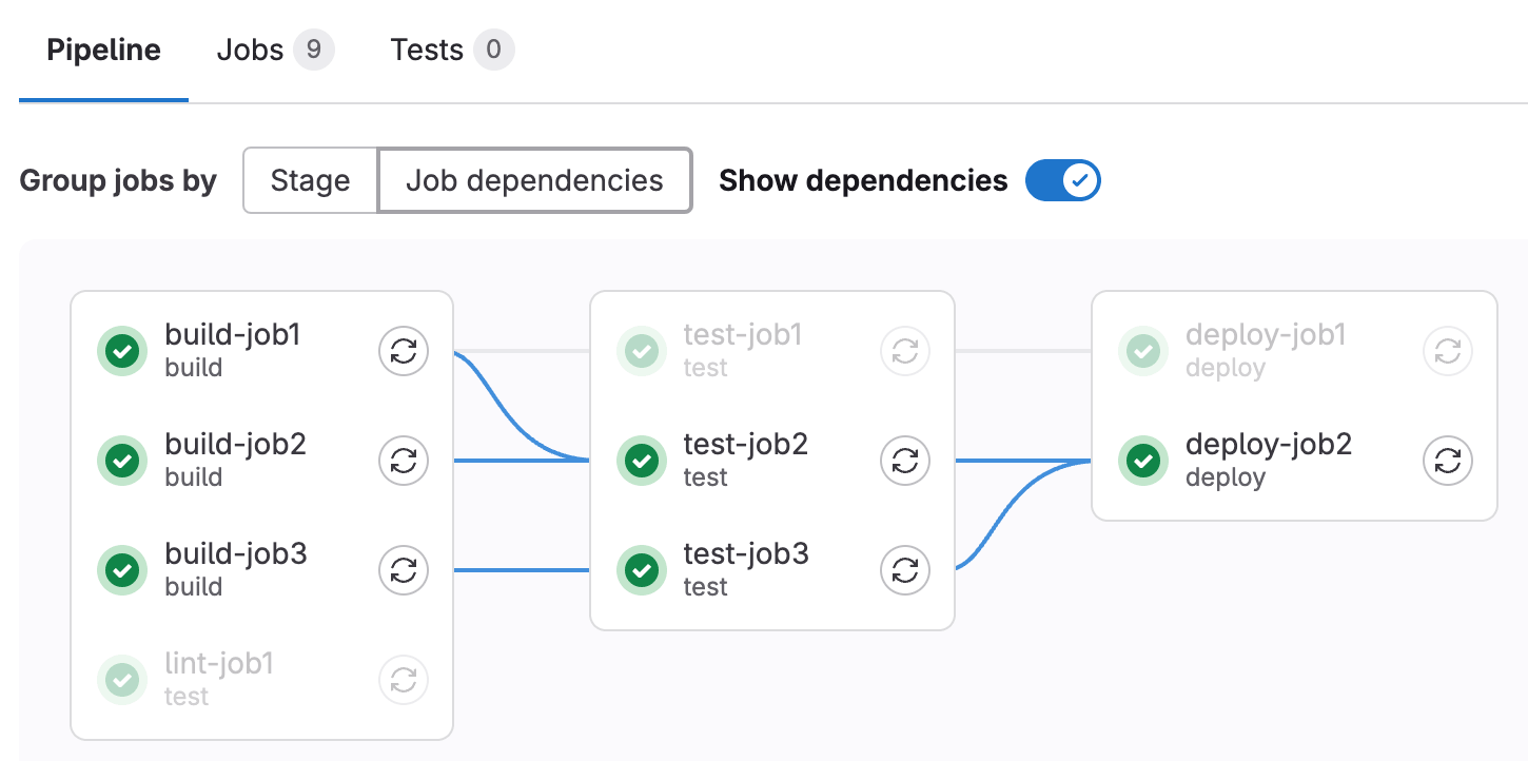
Pipelines are structured into stages and jobs. Stages define the execution order (e.g., Build, Test, Deploy), while jobs define the specific tasks to be performed within those stages. This structure creates a clear cause-and-effect relationship: if a test job fails in the “Test” stage, the pipeline stops, preventing faulty code from reaching the “Deploy” stage. This immediate feedback loop is critical for maintaining high-quality standards in complex product development.
The Engine Room: Understanding GitLab Runners
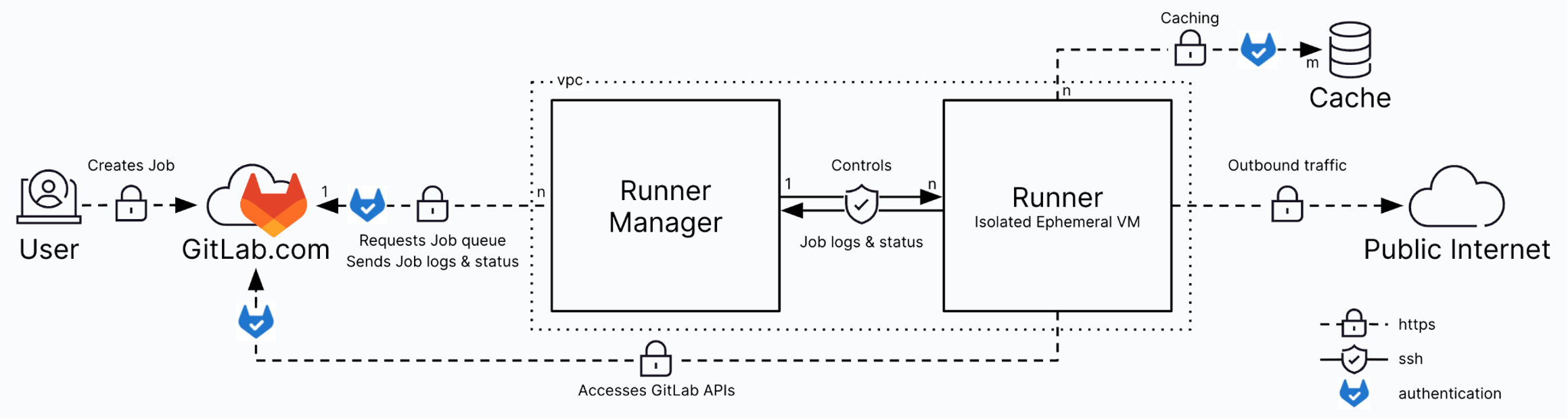
If the pipeline is the blueprint for your automation, the GitLab Runner is the engine that executes the work. A Runner is a lightweight, highly scalable agent that picks up jobs from the GitLab instance, executes them, and sends the results back.

Runners are decoupled from the GitLab application itself. This architectural choice provides immense flexibility. You can host Runners on-premises, in a private cloud, or within a public cloud environment like AWS or Azure. For organizations in regulated sectors like medical devices or aerospace, this flexibility is vital. It allows teams to run sensitive build jobs within a secure, validated environment while still utilizing the centralized management features of GitLab.
How Runners and Pipelines Work Together
The interaction between a pipeline and a runner is a coordinated dance of data and execution. When a developer pushes code, GitLab identifies the jobs defined in the .gitlab-ci.yml file. It then looks for an available Runner that matches the requirements of those jobs. This matching process often uses “tags.” For example, a job that requires a specific version of a compiler or access to a hardware-in-the-loop (HIL) testing rig can be tagged accordingly. Only Runners with the matching tag will pick up that job. This ensures that the right technology is put to work for the right task, preventing the “it works on my machine” syndrome that plagues siloed development teams.
Types of GitLab Runners: Shared vs. Self-hosted
Choosing the right type of Runner is a strategic decision that impacts both cost and control.
- Shared Runners: These are available to all projects in a GitLab instance. They are ideal for generic tasks like linting or basic unit tests. Using shared runners reduces administrative overhead, as the infrastructure is managed centrally.
- Self-hosted Runners: These are dedicated to a particular project or group. These runners are necessary when a job requires specialized hardware, custom software configurations, or access to protected network resources.
For engineering organizations, the goal is to balance speed and control. Over-reliance on shared runners can lead to bottlenecks during peak development times, while too many specific runners can create an unmanageable infrastructure footprint.
The Role of Executors in Job Execution
The “Executor” is the environment in which the Runner performs the job. GitLab supports several executor types, each with different trade-offs:
- Shell Executor: The simplest type, running jobs directly on the host machine. It is fast but lacks isolation between jobs.
- Docker Executor: The most popular choice. It runs each job in a clean container, ensuring a consistent and reproducible environment. This is essential for meeting ISO 13485 or ASPICE requirements, where environmental consistency is a core part of quality management.
- Kubernetes Executor: Allows the Runner to scale jobs dynamically across a cluster. This is the gold standard for large-scale engineering teams needing high availability and cost optimization.
Optimizing Pipeline Performance for Faster Feedback
In a high-pressure delivery environment, every minute an engineer spends waiting for a pipeline to finish is a minute of lost productivity. Optimizing pipelines is not just a technical task; it is a business necessity. One effective strategy is parallelization. By running independent test jobs simultaneously, you can significantly reduce the total wall-clock time of the pipeline. Another key tactic is caching. By caching dependencies (like npm modules or Maven artifacts) between runs, you avoid the time-consuming process of downloading the same files repeatedly. Integrated systems create traceability and visibility. When pipelines are optimized, they provide faster decision-making data to leadership, allowing for more predictable release cycles.
Security and Compliance in the CI/CD Pipeline
For regulated teams, the pipeline is a critical control point. It is where security scans, license compliance checks, and automated audits occur. GitLab Runners must be secured to prevent unauthorized access to the build environment or the secrets (like API keys) used during deployment.
Using protected variables and restricted Runner access ensures that only authorized pipelines can deploy to production environments. This level of control is what allows software teams in regulated industries to achieve speed and control at the same time. The team at SPK often helps organizations modernize these software delivery processes to ensure they meet SOC 2 or other standards without slowing down the engineering team.
Practical Modernization: Moving Beyond Generic Digital Transformation
Many organizations fall into the trap of treating CI/CD as a generic IT project. However, engineering teams need practical modernization that understands the “business of engineering,” which now includes AI. This includes the realities of hardware-software co-design and the pressure of regulatory audits. Modernizing your GitLab environment means ensuring that your tool decisions are driven by business goals. Whether it is migrating from Jenkins to GitLab CI/CD or optimizing a complex mechatronics toolchain, the focus should always be on reducing friction for the people doing the work.
Building a Foundation for Engineering Excellence
GitLab Runners and Pipelines are the foundational elements of a modern engineering ecosystem. By mastering their configuration and execution, organizations can deliver higher-quality products faster and with greater operational confidence. Siloed tools and manual processes create rework and compliance gaps. An integrated, automated pipeline creates a digital thread that connects requirements to code, and code to a validated release.
If your organization is struggling with slow pipelines, unreliable runners, or the complexities of maintaining a validated cloud environment for your engineering tools, SPK and Associates can help. We act as an extension of your team, bringing deep expertise in PLM, ALM, and DevOps to help you optimize the systems that drive product development. Our team even offers free GitLab assessments, so there is nothing out of your pocket for us to make recommendations for efficiency and a better ROI. Ready to optimize your GitLab environment? Contact the SPK team today to learn how we can help you modernize your engineering systems and software delivery processes.