
When it comes to licensing your PTC Integrity Lifecycle Manager server, you have the option of either purchasing seated licenses, floating licenses, or some combination thereof to service your user community. In this blog, I am going to discuss how to implement seat licenses into your PTC Integrity Lifecycle Manager environment. I am not going to discuss how to generate a new license file, nor am I going to discuss how you can install and configure FLEXnet for PTC Integrity.
If you look inside your license file, you’ll see that there are potentially several different types of licenses that are available. The types of licenses you can see in your license file are as follows:
- Integrity Server licenses. Typically, these come in pairs. You need both an MKSIntegrityServer and MKSIntegrityServer-DBBackend license in order to bring up your PTC Integrity Lifecycle Manager Server. These licenses typically read:
FEATURE MKSIntegrityServer MKS 5.0 05-sep-2014 2 576CEE12484A \
FEATURE MKSIntegrityServer-DBBackend MKS 5.0 05-sep-2014 2 \
In this case, there are two Server and Server-DBBackend licenses. When you purchase a server license, you get both from PTC.
- Integrity Manager licenses for PTC Integrity Lifecycle Manager Workflows and Documents functionality. Typically, these types of licenses come in two forms: floating licenses and seat licenses. Floating licenses, as the name implies, can float between users on a first-come-first-serve basis. Seat licenses, on the other hand, are typically allocated to and remain with that individual. These types of licenses typically read:
INCREMENT MKSIntegrityManager-Float MKS 5.0 05-sep-2014 5 \
INCREMENT MKSIntegrityManager-Seat MKS 5.0 05-sep-2014 10 \
In this case, you can see that there are 5 floating licenses and 10 seat licenses.
- Source Integrity licenses for PTC Integrity Lifecycle Manager Configuration Management functionality. Like the Integrity Manager licenses above, these types of licenses come in both floating and seat licenses, and function in the exact same manner. These types of licenses typically read:
INCREMENT MKSSourceIntegrity-Float MKS 5.0 05-sep-2014 5 B3FD779B56C4 \
INCREMENT MKSSourceIntegrity-Seat MKS 5.0 05-sep-2014 10 95E2CFBB6401 \
In this case, you can see that there are 5 floating licenses and 10 seat licenses.
Once you have your PTC Integrity Lifecycle Manager server up and running, users can log in and start using your floating licenses immediately. Seat licenses are another matter. Seat licenses need to be allocated before they can be used. To allocate seat licenses you’ll need to follow these steps:
- Create a new group in the MKS Domain that will contain a list of all the users who should be allocated seat licenses. In the example below, I created an MKS Domain Group called “SeatLicenseGroup”.
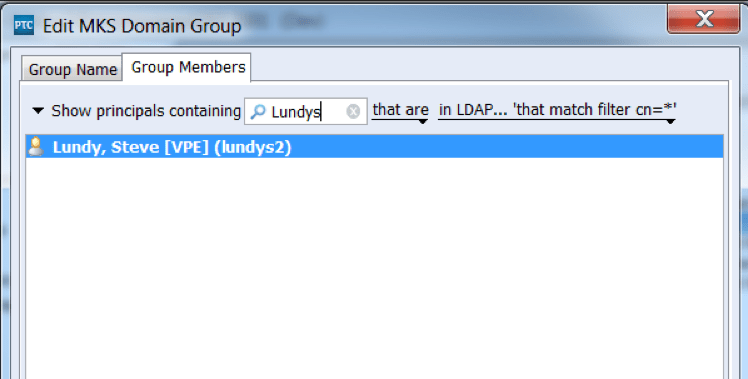
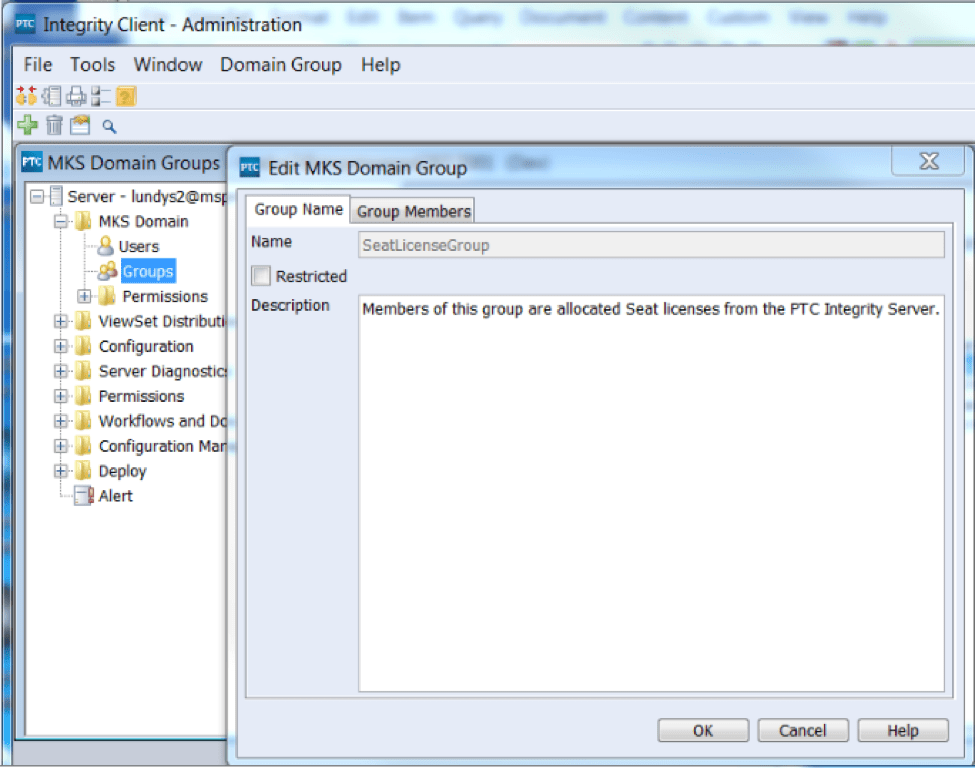 Members can be added to this group either from the MKS Domain, or from your local LDAP system as shown below:
- Once you have your SeatLicenseGroup, you’ll need to update your is.properties file on your PTC Integrity Lifecycle Manager server.
 The purpose of this is to ensure that your server knows where to look for its seat license allocation list. The mksis.imLicenseGroup property is used to configure the MKSIntegrityManager-Seat licenses and the mksis.siLicenseGroup property is used to configure the MKSSourceIntegrity-Seat licenses.
Once you’ve set up the group as well as the properties for the first time on your PTC Integrity Lifecycle Manager Server, the server will require a restart. Any subsequent additions or changes to your SeatLicenseGroup can be read on the fly by the server.
One thing to remember is that seat licenses can only be allocated once to a given user on a given server. This means that if you have a staged environment of, say, Development, Test, and Production, and you’ve implemented the exact same SeatLicenseGroup on all three servers, you could end up consuming three times the seat licenses than you actually intended. If you have a mix of floating and seat licenses, I would consider not configuring the is.properties file on your Development and Test servers, thereby reserving all of your seat licenses for your production users.
Another thing to remember is that the PTC Integrity Lifecycle Manager server will only allocate the licenses that are available. If you add more users to your SeatLicenseGroup than you have seat licenses in your license file, those users last added to the group will not be allocated a seat license.
I hope you have found this information on seat licenses within PTC Integrity Lifecycle Manager useful. Seat licenses are an important part of any purchase, and as such, it is important to utilize them properly.