


Key Takeaways
- Suppliers, customers, contractors, and manufacturing partners can take part in Jira work entirely by email, as well as extending the sphere of involved parties wider through use of email-only interaction.
- Enables timely/scalable mail handling through a single mailbox with additional alias addresses.
- Enterprise Mail Handler for Jira Cloud (JEMHC) turns inbound email into issues and comments, automatically routes it to the right project through Rules, and sends custom branded notifications back out.
- Email-based collaboration keeps external conversations in the issue record, which improves traceability for regulated teams.
- SPK helps engineering organizations design, configure, and govern these workflows so they scale securely.
Most engineering organizations don’t work alone. Suppliers, customers, contract manufacturers, and partners all play a part in getting products out the door, but some of them may never log in to the tools your teams use daily. Enterprise Mail Handler for Jira Cloud (JEMHC) turns everyday emails into structured Jira work, so external participants can collaborate from their inbox. Meanwhile, your team retains all requests, updates, and decisions in Jira. Let’s take a closer look at how these features work.
What Is Jira Enterprise Mail Handler?
Enterprise Mail Handler for Jira Cloud is an email integration app available on the Atlassian Marketplace. The Plugin People created it based on their existing Enterprise Mail Handler for Data Center. JEMHC allows you to create and update Jira issues from email with highly configurable rules, automatically routing incoming messages to the correct Jira projects. It connects to external mailboxes including Microsoft 365 and Google Mail, rather than Jira’s built-in mailbox. Project Mapping Rules route mail to create issues with custom per-project values; a dedicated email custom field keeps track of external email participants for each issue. Let’s dive deeper into the benefits of JEMH.


1. Bring In Email-Only Participants or Quickly Add Them to Issues
The simplest win is letting people contribute to Jira work without necessarily needing to log in or even having to register for an account. With JEMHC, anyone can send an email to be turned into a Jira issue, though there are allow/deny lists to scope this. Confirmation notifications are sent, and when they respond, their response becomes a comment on that same issue. JEMHC stores the addresses of email participants in a dedicated email custom field on each issue. Those participants then remain in the conversation as the issue moves through your workflow.
Your team can keep working in Jira as usual, or reply by email and include additional recipients, who are then added to the issue fields that allow them to contribute too. If they do not want to be added to Jira as a user, they can continue replying via email, without ever using Jira.
2. Streamline Supplier Collaboration
Supplier issues such as nonconforming parts, late deliveries, and engineering change requests typically reside in someone’s inbox. When that person walks out, so does the history! JEMHC can automatically map remote users to particular Jira projects and assignees based on the sender’s address. This means that emails from a component supplier can land in your supplier quality project and go straight to the right engineer. Mapping Rules can also route messages based on other criteria, so different suppliers or product lines go to the right team without manual triage.
Communication flows the other way, too. With ad hoc notifications, engineers can send an email directly from the Jira issue to notify a supplier about a corrective action, a revised drawing, or a delivery update, and JEMHC keeps a copy of that message as a comment on the issue for traceability. The result is one shared record of each supplier interaction, inbound and outbound. It is searchable, reportable, and related to the engineering work.
3. Track Customer Issues Without a Portal
Not all customer interactions need a full service portal. Many engineering teams track customer-reported defects, field issues, and feature requests right in Jira Software projects. JEMHC lets customers submit these issues by email and receive updates by email as well. In addition to this, teams may use directives for more control. A directive is a specially formatted value in an email that JEMHC can read to set the issue’s details, such as priority or summary. Your team can use them to capture structured information right from the beginning.
Furthermore, JEMHC can route errors from remote server applications into Jira projects without point-to-point firewall connections. Connected products and field systems can then report problems automatically. JEMHC even supports Nagios system monitoring notifications, so an alert can open a Jira issue when a problem is detected and automatically close it once the problem clears. That keeps your team focused on active issues instead of chasing alerts that have already resolved themselves.
4. Capture External Approvals and Sign-Offs
Engineering work is often waiting on someone outside the company, such as a customer approving a deliverable, a supplier validating a spec, or a partner approving a change. Chasing those answers via email and copying them into Jira introduces delay and risk. To prevent this, JEMHC captures the external party’s reply directly to the Jira issue, with the timestamp and sender’s address. Using directives, teams may also update issue details from the reply itself. Those replies can be paired with Jira Automation to help progress work without anyone having to retype a response.
While these automations are helpful, regulated teams should ensure they draw a clear line here. An email reply creates a useful record of agreement, but it is not a compliant electronic signature under FDA 21 CFR Part 11. For controlled approvals, keep formal sign-off in your validated quality or ALM system, and use email to capture the communication around it.

5. Automate Data Capture from System-Generated Email
Not every email that matters comes from a person. ERP systems, test equipment, supplier portals, and monitoring tools all send automated notifications that contain useful data, such as part numbers or order references. Too often, someone on your team reads those messages and retypes the details into Jira by hand. JEMHC can ingest mail from automated sources and pull out the values that matter. Using the Regexp Field Processor, your team defines patterns that match specific data in the message body or subject, and JEMHC places each value into the appropriate Jira custom field automatically. For regulated teams, that consistency also strengthens traceability, since key identifiers are captured exactly as the source system reported them.
BONUS – Control Email Notifications and Conversations
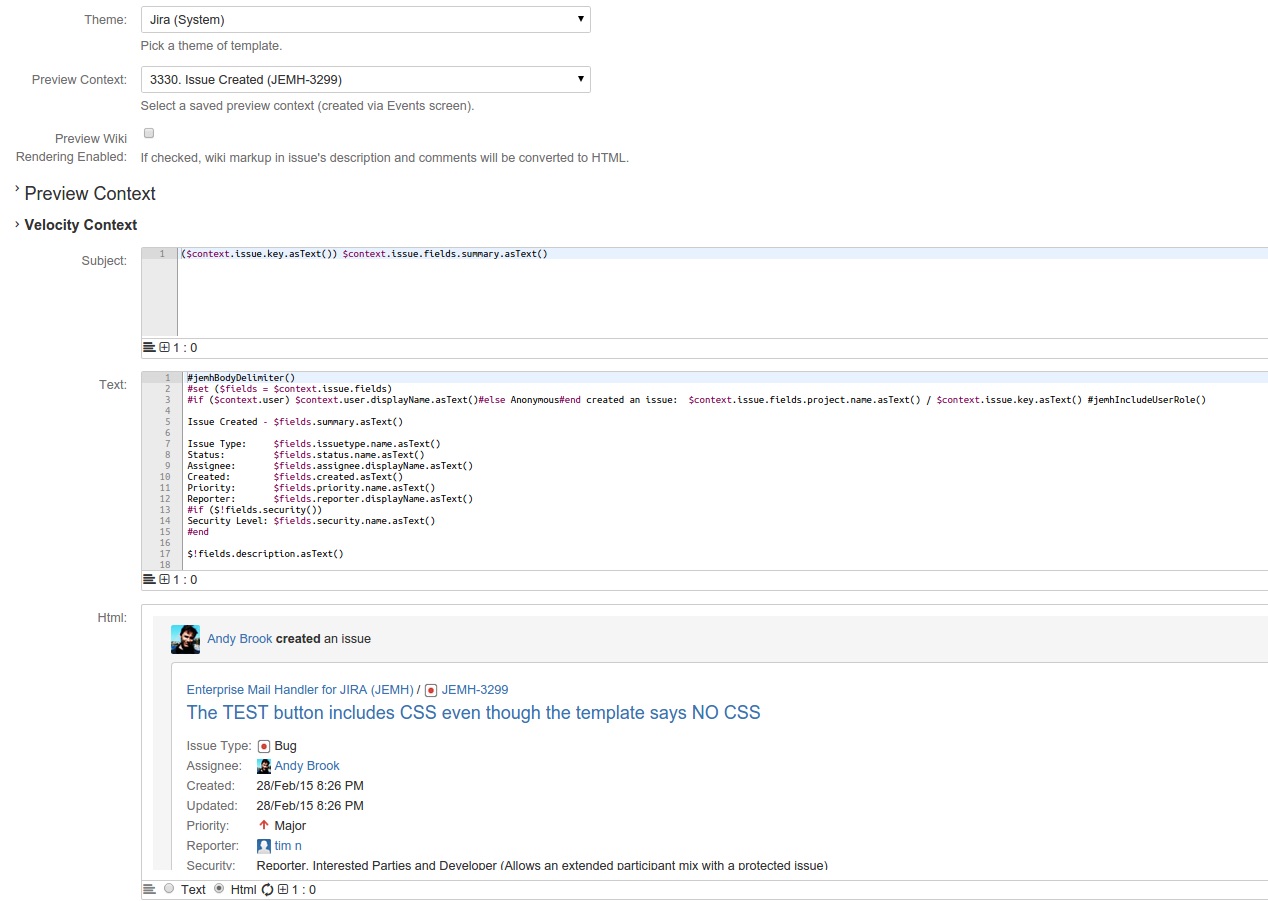
Collaboration only works if external participants get clear, relevant updates, but Jira’s default notifications are intended for licensed users. Fortunately, JEMHC provides full control over outbound email. Teams can create plain text or HTML Notification Templates with Velocity markup. Themes control styling, so messages match your brand. You can even upload images such as logos to include in them. Jira events trigger notifications, letting external participants know about the changes that matter to them.
Because replies thread back into the same issue, the full conversation stays in one place. Your team gets context, your partners get clarity, and you no longer need to forward emails between inboxes. JEMHC Auditing prevents data loss from misprocessed emails by maintaining a 90-day history of all mail received and sent and keeping raw email content available for a rolling 30-day window (incoming mail can be re-run!). For longer-term archival, organizations that need a full mail archive should forward copies to an archive mailbox, or use the JEMHC function to even attach the raw email to the issue.

Can External Users Collaborate in Jira Without A License?
Yes. With Enterprise Mail Handler for Jira Cloud, suppliers and customers create and update Jira/JSM issues by email. Their replies become comments on the issue, and they never need a Jira or JSM account.
Improve Collaboration with Enterprise Mail Handler for Jira Cloud
Working with external partners doesn’t have to mean more manual copying. JEMHC lets suppliers, customers, and partners collaborate with your team via email, while keeping messages, updates, and decisions within Jira. The features covered here are only the beginning. JEMHC can clean up icon images and graphics attached to issues as clutter, filter out out-of-office replies, non-delivery receipts, and other common noise, and additional field processors, such as the Script Field Processor, allow JavaScript manipulation and data extraction from message content. All of these capabilities are available and highly configurable, which is why setup is where you get the most out of this tool. Mailbox configuration, project mappings, routing rules, filters, field processors, notification templates, and data retention must be tuned to fit your workflows and compliance needs.
Mail volume is part of that planning. JEMHC usage isn’t unlimited: each month, customers receive a Capacity Plan allocation of messages and data (MB), based on the number of paid users in Jira. Teams that need more can add annual Plan Upgrades or DataPacks, which are bought short-term and stay usable for a year, so capacity grows with email traffic rather than with headcount. Built-in analysis features show where message and data volume is going, which helps teams spot heavy senders, noisy automated sources, or projects that need their own rules before they run into limits. Security matters, too. JEMHC and SPK and Associates are SOC 2 Type 2 compliant, so teams in regulated industries can extend Jira to external participants with the confidence that their data is handled to recognized standards.
Achieve Success with SPK
SPK is not just SOC 2 certified, but an Atlassian Gold Solution Partner that helps engineering organizations select, configure, and manage the right Marketplace apps for their needs. If your team is interested in how JEMHC can improve your customer and supplier collaboration, contact us today.