

Wiring diagrams can quickly become overwhelming, especially when you are working with older systems, custom components, or equipment that has been modified over time. Whether you are restoring a vintage moped or documenting a modern electrical system, having a clear and organized diagram can make troubleshooting, maintenance, and collaboration much easier. draw.io provides the flexibility needed to create wiring diagrams that are both accurate and easy to understand. With electrical shape libraries, custom components, color-coded connectors, layers, and Confluence integration, users can build diagrams that simplify even the most complicated systems.
How to Create Wiring Diagrams in draw.io
Creating a wiring diagram in draw.io starts with using the right shapes. draw.io includes extensive electrical shape libraries that allow users to represent common components such as switches, connectors, bulbs, batteries, and circuits. These standard symbols provide a strong foundation for building diagrams that others can quickly recognize and understand. However, not every system fits perfectly into standard libraries. Some wiring setups include unique components or older parts that may not have an exact shape available.
Features in draw.io
In these cases, draw.io allows users to create custom components by grouping multiple shapes together. To do this, simply click and drag over the elements you want to combine, right-click, and select Group. This turns multiple shapes into one reusable component.
Once you have created a custom component, you can drag it into your personal Scratchpad. This creates your own custom library, making it easy to reuse the same shapes across future diagrams. For users who create wiring diagrams regularly, this can save time and help maintain consistency.
Layers are another helpful feature, especially for more complex systems. By separating different circuits or sections of a diagram into layers, you can toggle systems on and off as needed. This makes it easier to troubleshoot individual parts of the system without the diagram becoming visually crowded.
Additionally, Connectors are essential for wiring diagrams because they act as the wires between components. In draw.io, connectors can be customized to match the physical wires in the system. For example, if a wire in the real system is brown and white, you can color-code that same path in the diagram. This makes the diagram more intuitive and easier to follow during repairs or reviews.

When diagrams are built in Confluence, they become even more useful. Your wiring diagram can live directly alongside project notes, repair documentation, requirements, or maintenance instructions. Confluence permissions allow teams to control who can view or edit the diagram, while searchable text and version history make it easier to find information and track changes over time.
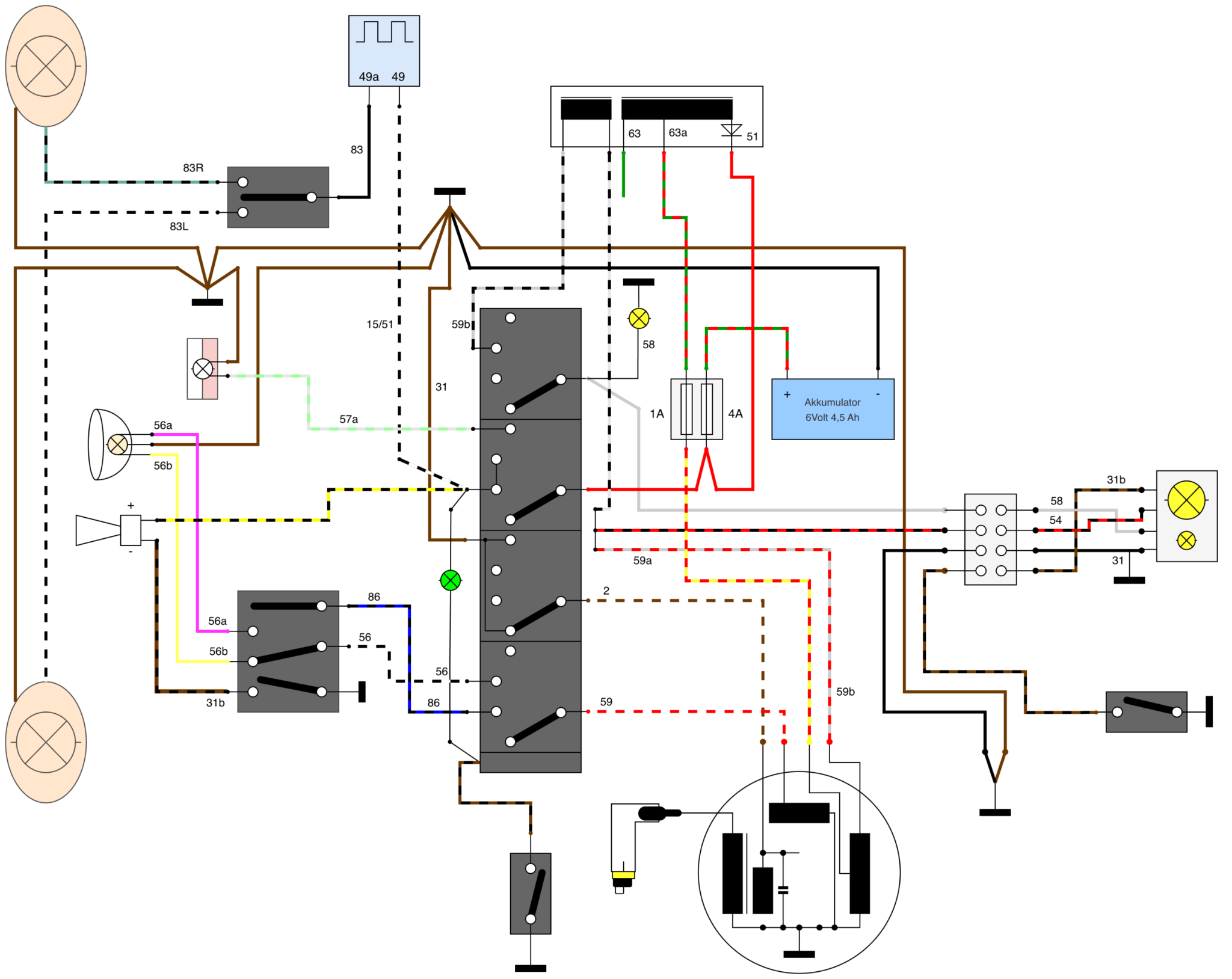
Wiring Diagram in draw.io example: The Simson Schwalbe KR 51
The Simson Schwalbe KR 51 is a vintage moped first built in 1964 in Suhl, East Germany. The Schwalbe became an important part of mobility in the German Democratic Republic. Today, it has achieved cult status across Germany because of its vintage design, nostalgic appeal, and extensive customization options. The Schwalbe is a great example because its wiring is simple in philosophy but unique in execution. Like many East German vehicles of the time, it was designed with efficiency and repairability in mind. Engineers had to work with limited resources, so they prioritized simple, reliable systems that owners could maintain themselves.
That same mindset applies to good diagramming. The clearer the diagram, the easier it is for someone else to understand, repair, or improve the system. To capture the Schwalbe’s unique wiring setup, one user combined standard electrical symbols with custom grouped elements. This allowed them to represent specific components accurately while keeping the diagram clean and readable. This user also used custom connector colors to match the actual wires in the moped. For more complicated sections, layers could be used to separate different circuits and reduce clutter. This makes it easier to focus on one system at a time, whether you are checking lights, ignition, charging, or another part of the moped’s electrical setup. The result is a wiring diagram that brings a 1960s machine into a modern digital workspace. It preserves the DIY spirit of the original design while making the information easier to access, edit, and share.

Creating Wiring Diagrams in draw.io
Regardless of the product you are aiming to map out, draw.io gives you the tools to make wiring diagrams clear and manageable. Standard electrical shape libraries help you get started quickly, while additional elements allow you to tailor the diagram to your exact system. When used inside Confluence, draw.io also helps keep wiring diagrams connected to the rest of your project documentation. Teams can collaborate more easily, search for diagram content, manage permissions, and track revisions over time. The Simson Schwalbe example shows that even a vintage system can benefit from modern diagramming tools. With draw.io, you can simplify complex wiring, improve documentation, and make your diagrams easier for others to understand. To get started with draw.io, reach out to our team. We are a certified partner offering draw.io and can support your needs for best practices.