
spk-logo-tm-2023
0%
1-888-310-4540 (main) / 1-888-707-6150 (support) info@spkaa.com
Select Page

Upgrading from ClearCase/ClearQuest 7.0 to 7.1

As an IT engineering expert for SPK and associates, a California based IT services company, I write blog posts on topics such as Software Configuration Management and other Engineering Applications. This week I’d like to blog about my experiences in upgrading ClearCase® and ClearQuest® (CC+CQ) from version 7.0.1.x to version 7.1.  Normally one would think that this would be kind of a no-brainer.  I mean, it’s a point release, right?  Well, not so fast.  It turns out that going from CC and/or CQ 7.0 to 7.1 is a bit of a different exercise than going from say, 7.0.0.x to 7.0.1.x. To start with, you cannot just upgrade on top of an existing 7.0.x install with 7.1.  You need to first completely remove your old 7.0 installation of CC+CQ, and then proceed with installing 7.1.  The next surprise is that IBM has introduced a whole new mechanism for installing Rational® software, their new Installation Manager tool (IM).  The IM is what you will start up and work with when installing Rational tools, not any longer the familiar install widget for each separate tool.
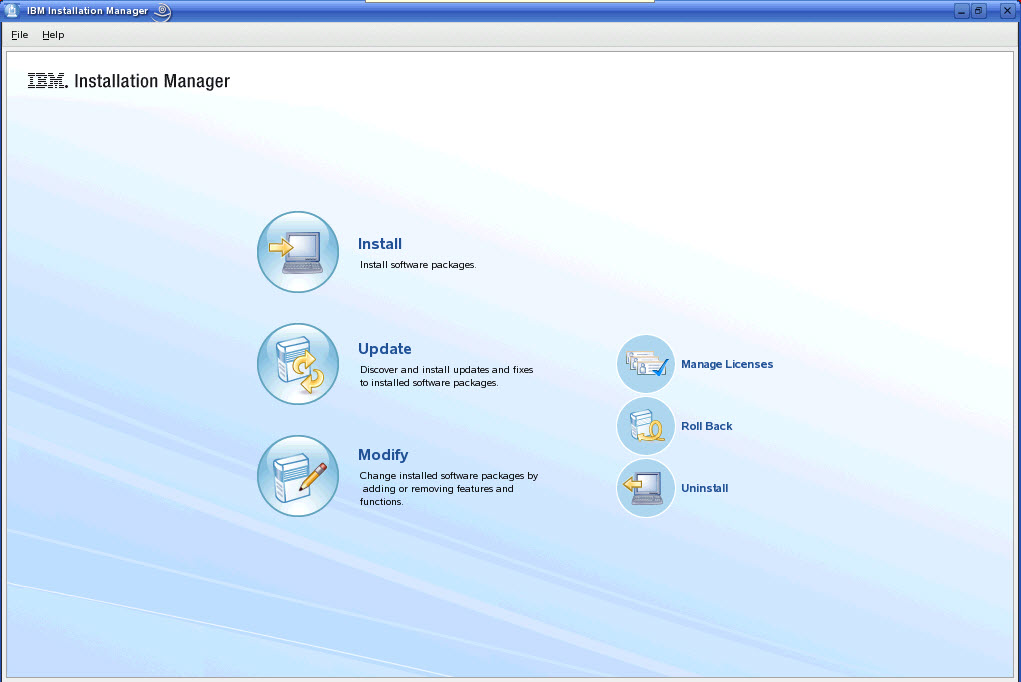

IBM Installation Manager Tool

But I’ve found that there are upsides to all this.  First, IM now installs the Rational tools in what is called a Package Group.  Each tool is its own Package (CC, CQ, RequisitePro, or whatever).  Each Package Group only allows for compatible versions of software to be installed in it.  For example, if you install CQ 7.1.1.2, and you also want to install CC, you MUST install the same version as CQ, else it will create a separate Package Group to install the incompatible tool into.  And multiple Package Groups on one machine are normally going to be an undesirable thing. So, having IM double check your install versions is, I think, a helpful thing.  And an even more helpful feature of IM is that it will go out and find new patch levels and install them for you, under your direction.  No more searching the IBM website for the latest patch bundles, downloading and keeping them around somewhere.  IM now manages this for you.  This is all the short story, the details are coming up. I’ll state upfront that you won’t want to go through everything that you see in this install presentation more than once.  I only show everything to present all the details of a 7.1.x upgrade for informational purposes.  Normally you will want to prepare an install area for IM to work from.  But … that will have to be the topic of a future blog post! To view the full document click on:  SPK_WebsiteRational7.1_Install3 Subscribe to our blog to keep informed on Engineering Applications, remote server management, remote application management, and other topics related to IT engineering.

Latest White Papers

Strategies for Cloud and AI Transformation

Strategies for Cloud and AI Transformation

As businesses modernize, cloud solutions and AI seem to be the default. Dive into this eBook to explore why this is, as well as some modernization strategies.What You Will Learn In this eBook, you will learn how: AI is driving modernization Cloud is delivering results...

Related Resources

Beyond the Buzz: What 2026 Demands of Tech & Engineering Leaders

Beyond the Buzz: What 2026 Demands of Tech & Engineering Leaders

In the tech space and beyond, modern buzz has all pointed to AI. While I love exploring new ideas, I am also quite a pragmatist. This past year, I’ve navigated through endless white papers, blogs, books, videos, social posts, and articles about AI. These detail how it...

Decoding Field Failure Trends to Rescue Product Quality

Decoding Field Failure Trends to Rescue Product Quality

Manufacturers operating in competitive, highly regulated markets understand that product quality does not stop at release.  Once products reach the field, real-world operating conditions, usage patterns, and environmental stressors begin to reveal failure behaviors...