

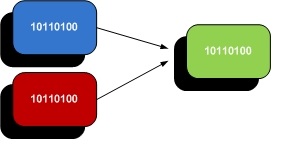
 We recently obtained the necessary licenses required to enable one of our clients’ FAS2050 filers for deduplication. Currently, deduplication is offered by Netapp for free. You simply need to get in touch with your reseller and request both ASIS licenses and Nearstore licenses. The Nearstore license for FAS should also be available at no cost as well. Once Netapp has approved the request, the new license codes should be available on now.netapp.com.
filer> license add xxxx_KEY_xxxx
Some background on the way that Netapp’s deduplication works– I found this to be really interesting. The backend filesystem (WAFL) uses several mechanisms to ensure data integrity and reliability. As such, each block of data has an associated checksum. This is the perfect “fingerprint” needed by the dedupe process to identify each piece of data. Imagine taking an existing 2TB volume and having to checksum thousands if not millions of files. This would take an enormous amount of time and CPU overhead. Instead, when a dedupe process is initiated on an existing volume, checksums that already exist are simply counted up and tallied. To be completely sure that a block is in fact a duplicate, the filer will then do a byte-by-byte comparison of the two blocks before marking them as deleted.
Let’s start by enabling deduplication of a volume:
filer> sis on /vol/engbackup
SIS for “/vol/engbackup” is enabled.
Already existing data could be processed by running “sis start -s /vol/engbackup”.
The filer reminds us that existing data fingerprints have not yet been tallied, so we must force a scan of the entire volume’s fingerprints:
filer> sis start -s /vol/engbackup
The file system will be scanned to process existing data in /vol/engbackup.
This operation may initialize related existing metafiles.
Are you sure you want to proceed (y/n)?
We can monitor the status of the dedupe:
filer> sis status -l
Path: /vol/engbackup
State: Enabled
Status: Active
Progress: 1001936 KB Scanned
Type: Regular
Schedule: sun-sat@0
Minimum Blocks Shared: 1
Blocks Skipped Sharing: 0
Last Operation Begin: Wed Aug 24 17:13:51 PDT 2011
Last Operation End: Wed Aug 24 17:13:51 PDT 2011
Last Operation Size: 0 KB
Last Operation Error: –
Changelog Usage: 0%
Checkpoint Time: No Checkpoint
Checkpoint Op Type: –
Checkpoint stage: –
Checkpoint Sub-stage: –
Checkpoint Progress: –
The key item to note above is that the default schedule for dedupe of all volumes is everyday at midnight. Depending on your environment and data usage patterns, you may want to either decrease this or increase this frequency. You will want to keep an eye out on your Cacti graphs for CPU utilization. So far we have not seen any issues.
The biggest deduplication gains are with our Oracle Agile PLM implementation. The production instance consists of a 30GB database and 500GB worth of flat files (pdf, xls, doc files). With 7 development instances and 3 test/training instances, deduplication provides a significant savings of space.
filer> df -s
Filesystem used saved %saved
/vol/agiledev/ 490124300 87190228 15%
/vol/agiletest/ 715371208 505386684 41%
/vol/agiledev3/ 623382540 840396796 57%
A “df -s” will show exactly how much space you’ve saved. In the case of the agiledev3 volume, the volume is now only 43% its original size. Over 840GB of data was made redundant!
In conclusion, deduplication can provide significant space savings at no extra cost. It has a flexible schedule mechanism to minimize CPU impact during peak usage hours. Unfortunately, the downside that we discovered is that any snapmirror destinations must have deduplication enabled as well. With a FAS270 as our snapmirror destination, this didn’t bode well for us as the FAS200 series does not support deduplication. Seeing good deduplication rates on your filer? I’d be interested to know what types of other applications make good dedupe candiates — let me know!
Michael Solinap
Sr. Systems Integrator
SPK & Associates