



I recently came across a forum post asking for advice on the combination of running Pro/Intralink 3.4 on Windows 7 64-bit. In short, I’m happy to report that we’ve been using this combination without incident:
- Microsoft Windows 7 Professional 64-bit SP1,
- PTC Pro/INTRALINK 3.4 build M062, and
- PTC Pro/ENGINEER Wildfire 4.0 build M190
Although it’s only been six months, we haven’t had a single problem, and the Engineers are pleased to with their Windows 7 features and 12 GBs of RAM. Here are the key steps you’ll need to configure in order to make the entire system work together.
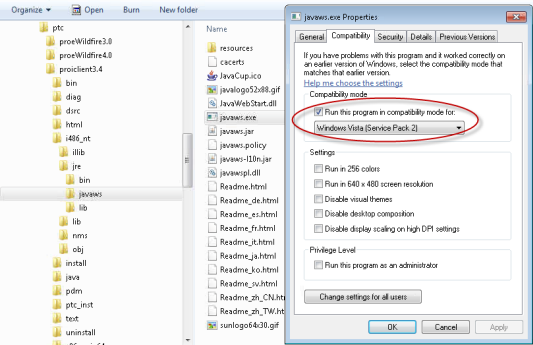
Set javaws.exe Compatibility Mode
You’ll need to use Windows 7’s “compatibility mode” feature to get Intralink to run. Intralink is packaged with its own Java runtime – find this file (typically at C:\Program Files (x86)\ptc\proiclient 3.4\i486_nt\jre\javaws\javaws.exe) and set it to one of the ‘Windows Vista’ options.
 Disabling DirectDraw for Intralink
Without getting into many details, Intralink is launched by opening “Intralink.jar” with “javaw.exe”. This is transparent to users who using shortcuts pointing to proilinkrelease_3.4.bat – but it’s important to understand this as a system administrator. If you open up your proilinkrelease_3.4.bat file in Wordpad, you’ll find this line near to the very end:
32-bit Intralink Launch Command:
start /B %prodir%\%mc%\jre\bin\javaw -Xmx256m -Xss8m -jar %PRO_DIRECTORY%\java\lib\Intralink.jar -l %luknfeel% %intralinkparams% >> “%logfile%”
You’ll need to modify this slightly by adding the Dsun.java2d.noddraw parameter in order for Intralink 3.4 to run properly. You can also add the Dswing.useSystemFontSettings parameter so that the text displays properly.
64-bit Intralink Launch Command:
start /B %prodir%\%mc%\jre\bin\javaw -Dswing.useSystemFontSettings=false -Xmx256m -Xss8m -Dsun.java2d.noddraw=true -jar %PRO_DIRECTORY%\java\lib\Intralink.jar -l %luknfeel% %intralinkparams% >> “%logfile%”
You can also add both lines to your BAT file using an IF command, allowing you to maintain a single file for all of your clients:
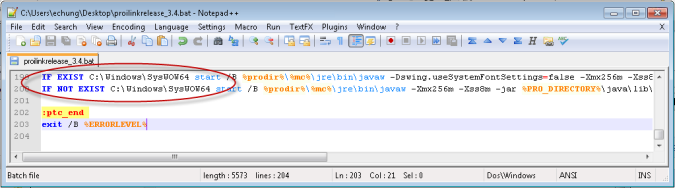
You can download my proilinkrelease_3.4.bat file. It should work on either the 32-bit or 64-bit platforms!
Link Pro/ENGINEER to Pro/INTRALINK
Lastly, make sure that your Environment Variables are set for Pro/ENGINEER Wildfire 4.0 to find your Pro/INTRALINK 3.4 installation. This is controlled by the PSF file; just make sure that these three lines are correct:
ENV=INTRALINK_DIR=C:\PROGRA~2\ptc\proiclient3.4
ENV=ILINK_CMD_NAME=proilinkrelease_3.4.bat
ENV=INTRALINK_CMD=%INTRALINK_DIR%\bin\%ILINK_CMD_NAME%
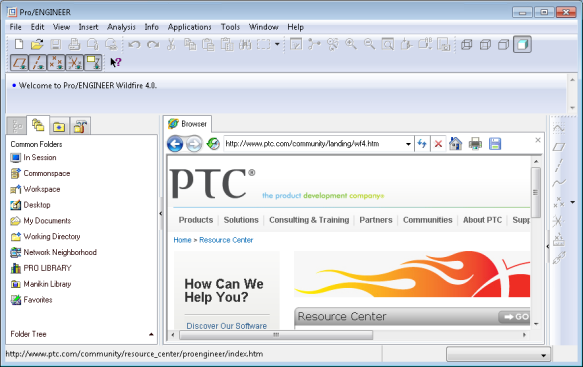
Once you configure these three files, your users will be able to use Wildfire 4.0 on their fancy Windows 7 machines. You can verify this by launching Pro/ENGINEER Wildfire and noting the “Commonspace” and “Workspace” links. These changes are all computer specific, but if you include it in your Clonezilla image you won’t have to adjust them again until you upgrade to Wildfire 5.0 or Creo Elements!
Are you having problems with other 64-bit software? Leave a comment with some details and your email address; I’ll write my next blog entry on how to get it running properly on the Windows 7 platform!
Edwin Chung
Application Integration Engineer, SPK